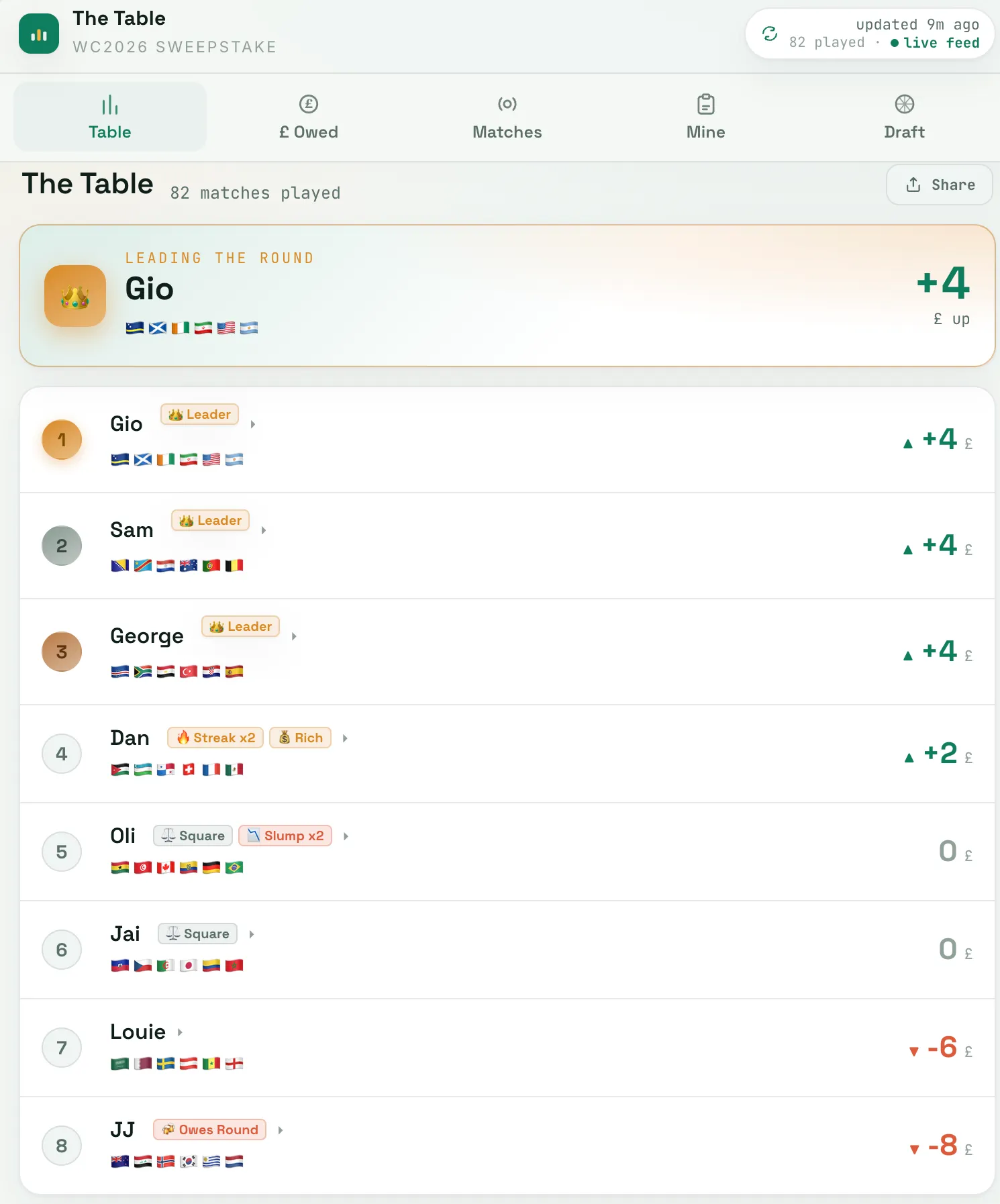
This summer I built a live sweepstake tracker for the World Cup in an evening: a Cloudflare site with a Worker backend, push notifications and an installable app. A year ago that would have taken me several weekends, and I probably wouldn’t have finished it. The difference wasn’t that I’d become a much faster programmer. It was that since the spring I’ve had an AI agent running for me, and I can hand it a project the way you’d hand one to a capable friend.
That agent is Hermes. This post is about how I set it up, what I use it for, and what isn’t perfect about it.
What Hermes is#
Hermes Agent is an open-source AI agent made by Nous Research. The easiest way to explain it is by comparison with a chatbot. A chatbot waits in a browser tab, answers, and forgets. Hermes runs continuously on a machine I control, and it can:
- use tools: a terminal, the web, files and APIs, so it can act rather than just advise;
- remember: it keeps notes on me, my projects and my preferences across conversations;
- learn procedures: after a complex task it writes itself a “skill”, a step-by-step recipe it reuses the next time something similar comes up;
- run on a schedule: it has a built-in scheduler, so jobs can run without me asking.
I talk to it through Telegram, so it is in my pocket like any other chat: I send it a message, and it replies when the job is done.
How I set it up#
The basic install is short, which is part of why I tried it:
curl -fsSL https://hermes-agent.nousresearch.com/install.sh | bash
hermes setup
The setup wizard asks which model provider to use, and hermes model changes it later without touching any code.
Telegram#
To reach it from my phone, I made a Telegram bot:
- Message @BotFather on Telegram, send
/newbot, and keep the token it gives you secret. - Run
hermes gateway setup, choose Telegram, and paste in the token along with your numeric Telegram user ID. The allow-list matters: without it, anyone who finds the bot could talk to your agent. - Start it with
hermes gateway.
The delegation ladder#
Running an agent all day means a lot of model calls, and paying top prices for every one would be expensive and wasteful. So Hermes works down a ladder of models:
- An OpenCode Go subscription as the main rung: a flat monthly plan covering a set of capable open models.
- Free models when that allowance runs low.
- Paid models through OpenRouter as a last resort, so it never simply stops.
Most work never leaves the first rung. When I’m building something substantial, like the World Cup tracker, the heavy coding goes to Claude Code, which also deploys to Cloudflare for me.
Laptop, with a VPS as backup#
Hermes normally runs on my laptop. When the laptop is shut or unreachable, a VPS picks up so I can still reach it on Telegram. I’d be lying if I said I could explain exactly how the handover works, because I didn’t build it. I asked Hermes to make itself reachable when my laptop was off, and it set the whole thing up, and it has worked since. That is probably the best illustration of what it is like to use: I describe the outcome, and it deals with the details.
What I actually use it for#
- Building things. Planning, writing and shipping projects like the sweepstake tracker. I decide what to build and how it should be shaped; it does most of the implementation.
- My calendar and errands. Adding and moving things in my calendar, and chasing the small jobs I’d otherwise forget.
- Scheduled jobs. Tasks that run on their own and message me the result on Telegram, so information comes to me rather than me going to look for it.
- Research and summaries. Reading around a topic and giving me the short version, with sources to check.
- Study and admin. Revision, organising deadlines, and getting ready to start at Cambridge.
- Planning explores. Before visiting an abandoned site or a cave, I use it for open-source research: old maps, historical records and accounts from other people, what condition a place is likely to be in, and whether access is allowed. The explores themselves are written up on cesspool.uk.
- Odds and ends, like keeping my Nuvio media library and add-ons organised.
Keeping it on a leash#
An agent that can run commands, and has access to my Cloudflare account, needs limits. Mine are:
- Approval prompts. Before anything potentially destructive, it stops and asks on Telegram, and nothing happens until I reply yes.
- Scoped API tokens. Each service gets a token with only the permissions it needs, rather than full access to my accounts.
- Spending limits on every model provider, so a runaway loop can’t cost much.
- A customised SOUL.md. Hermes reads a file called SOUL.md at the start of everything it does, which sets its personality and ground rules. I’ve rewritten mine, along with some other prompts, to make it more careful about acting outside what I’ve asked for.
What isn’t perfect#
Hermes is an open-source project that is updated constantly, not a polished consumer product, and it shows in maintenance. Over time, hidden bloat builds up: leftover files, overlapping skills, configuration that no longer does anything. Every so often I point Claude Code at the installation to find it all and clean it out, which keeps Hermes running smoothly.
It has also made a real mistake. I once had my travel plans in a Google Doc, and Hermes decided to tidy it up by reformatting it. The new version looked better, but it contained wrong information. With the calibre of models I have available now I see that problem as solved, but it was a useful early lesson in what handing over control means.
What it’s changed#
The biggest change isn’t any single task. Things I used to only talk about building, I now build, because the gap between having an idea and having something working has shrunk to an evening. The skill that matters has shifted too: less about knowing every API by heart, more about knowing what to build, how to split it into the right pieces, and how to direct something capable enough to build it.
If you’re curious, Hermes is free and open source. Start with something small you’d like done every day, and see how quickly you start handing it bigger things.